
How Thermal Management Shapes Sustained Smartphone Performance
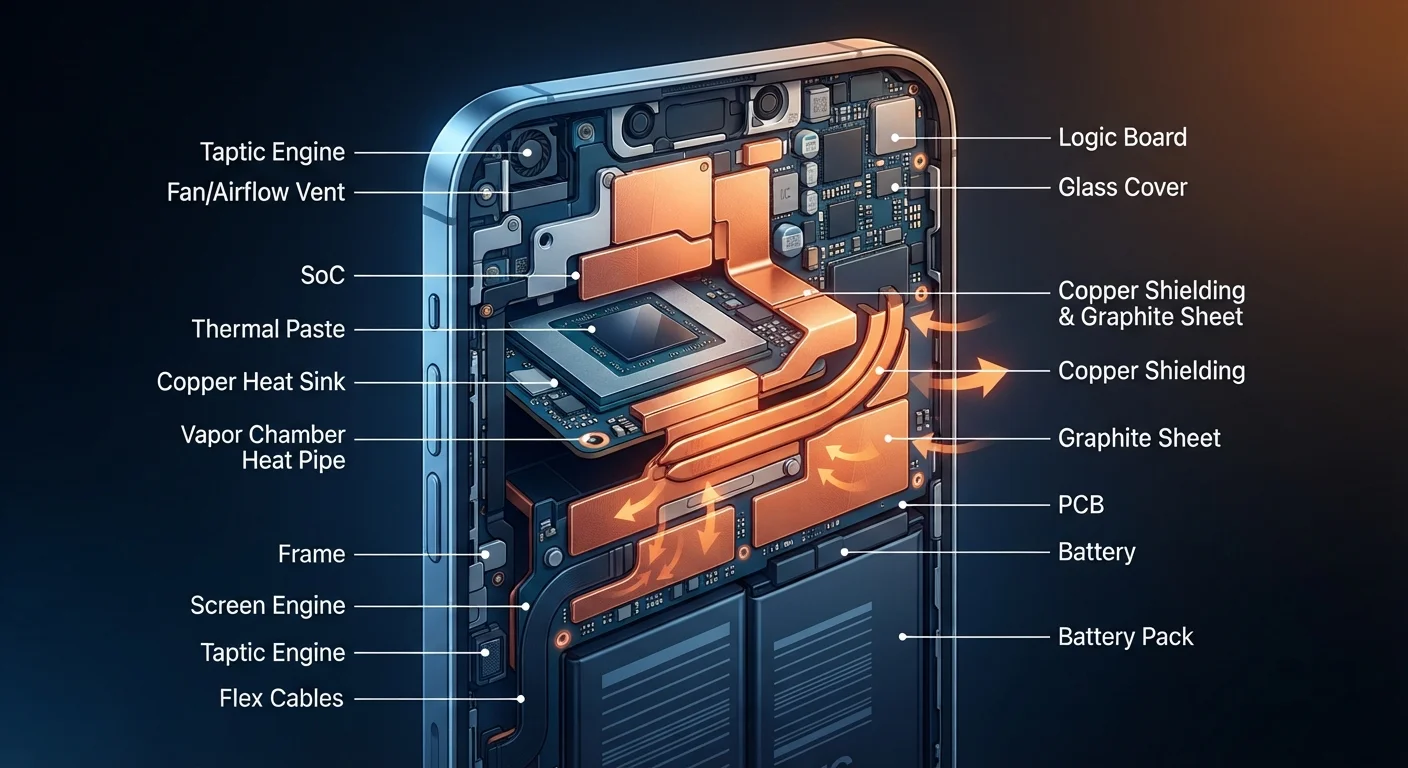
Photo credit: Telecom360.net | Connecting You To The Latest In Telecom
In this article
Heat is the hidden limiter of mobile performance. Learn how cooling design, throttling, and chip architecture interact during demanding tasks.
Key Takeaways
- Heat is the primary reason smartphones can't sustain peak performance indefinitely under load.
- Thermal throttling is a deliberate, protective reduction of processor speed triggered by rising temperatures.
- Physical cooling materials - graphite sheets, vapor chambers, and thermal paste - vary significantly across device tiers.
- Chip architecture efficiency matters as much as raw clock speed for sustained real-world performance.
- Software workload scheduling can distribute heat generation more evenly across processor cores.
Why Heat Limits What Your Processor Can Actually Do
A smartphone's processor is rated for a peak clock speed - but that number tells only part of the story. Sustaining that speed generates heat, and heat accumulates faster than most thin-glass chassis can shed it. When internal temperatures exceed engineered thresholds, the device's firmware steps in and reduces clock speeds to prevent component damage. The result is a measurable drop in processing throughput during the exact moments users need performance most.
This is why benchmark scores captured in short bursts often diverge from real-world experience during extended gaming sessions, video exports, or continuous camera use. Thermal throttling is the mechanism behind this gap - and no specification sheet lists how aggressively a given device will throttle under sustained load.
~10-15%
Typical CPU clock speed reduction under sustained thermal throttling
Independent device testing across multiple smartphone categories has consistently observed clock speed reductions in this range during extended high-load workloads before temperatures stabilize.
3-5nm
Process node size in current flagship mobile chips
Leading mobile SoCs use process nodes in the 3-5 nanometer range, offering substantially improved power efficiency compared to nodes from just three to four generations prior.
up to 2×
Heat dissipation improvement with vapor chambers vs. graphite sheets
Engineering analyses of mobile cooling solutions have shown vapor chambers can move heat up to twice as effectively as single-layer graphite spreaders under peak thermal load conditions.
The Physical Cooling Toolkit: From Graphite to Vapor Chambers
Hardware engineers have several tools available to slow heat buildup. The most common in mid-range devices is a graphite thermal spreader - a thin sheet layered over the SoC that distributes heat laterally across a larger surface area before it reaches the chassis. Graphite is inexpensive and effective for moderate workloads, which is why it appears across a broad range of device price points.
Flagship devices increasingly incorporate vapor chambers - sealed structures containing a small volume of fluid that absorbs heat through evaporation and releases it through condensation. This phase-change cycle moves heat more efficiently than passive conduction alone, allowing higher sustained clock speeds before throttling initiates. Thermal interface materials, such as specialized pads or paste between the chip and spreader, further reduce resistance at the hottest contact points.
Give Your Phone Room to Breathe
Cases with poor ventilation trap heat against the chassis and can accelerate throttling during demanding tasks. If sustained performance matters - during extended gaming or video recording - removing a thick case or using one with deliberate airflow cutouts around the SoC area can meaningfully delay the onset of throttling.
The physical volume available inside the chassis constrains all of these solutions. Ultra-thin designs limit the depth of vapor chambers and reduce the total surface area available for heat dissipation - a genuine engineering tradeoff that affects every device in the category.
Chip Architecture and Process Node Efficiency
The silicon itself determines how much heat a processor generates per unit of work completed. Chips manufactured on a smaller process node - measured in nanometers - pack more transistors into a given area and generally operate more efficiently, producing less heat per clock cycle. This efficiency advantage translates directly into better sustained performance, because the thermal headroom is consumed more slowly.
Beyond process node, chip designers have adopted heterogeneous core architectures that pair high-performance cores with efficiency cores. The efficiency cores handle routine and background tasks while generating far less heat. Workload scheduling - deciding which tasks run on which cores - is a software-level function that has significant thermal implications. Poorly optimized scheduling that routes lightweight tasks to power-hungry cores wastes thermal headroom unnecessarily.
For a broader look at how hardware specs translate into daily use, the Hardware & Specs hub covers these architecture concepts in greater depth.
Software's Role in Thermal Strategy
Firmware and the operating system actively participate in thermal management through several mechanisms. Throttling curves - the rate and severity of clock speed reductions at given temperatures - are configurable and often adjusted via software updates after a device ships. Manufacturers tune these curves based on real-world user data, which is why a device's thermal behavior can change meaningfully over its supported lifecycle.
Beyond throttling, the OS determines how background processes are scheduled and whether they compete with foreground tasks for processor resources. Uncontrolled background activity raises the baseline temperature before a demanding task even begins, shrinking the thermal buffer available for sustained performance. Managing background activity is therefore not just a battery-preservation habit - it directly affects how much thermal headroom remains for demanding workloads.
Understanding these interactions helps explain why two devices with similar peak benchmark scores can behave very differently during a 30-minute navigation session or a sustained video call - and why slowdowns over time are rarely attributable to a single cause.
Frequently Asked Questions

Author
Consumer Electronics Editorial Team
Consumer Electronics Editorial Team is the collective byline for our editorial team and contributor network. Articles published under this byline or an editorial pen name are researched, written, and reviewed according to our editorial standards for clarity, consistency, and independence before publication.
View all articles →