
Document Collaboration vs. Project Management: Where the Boundary Lies
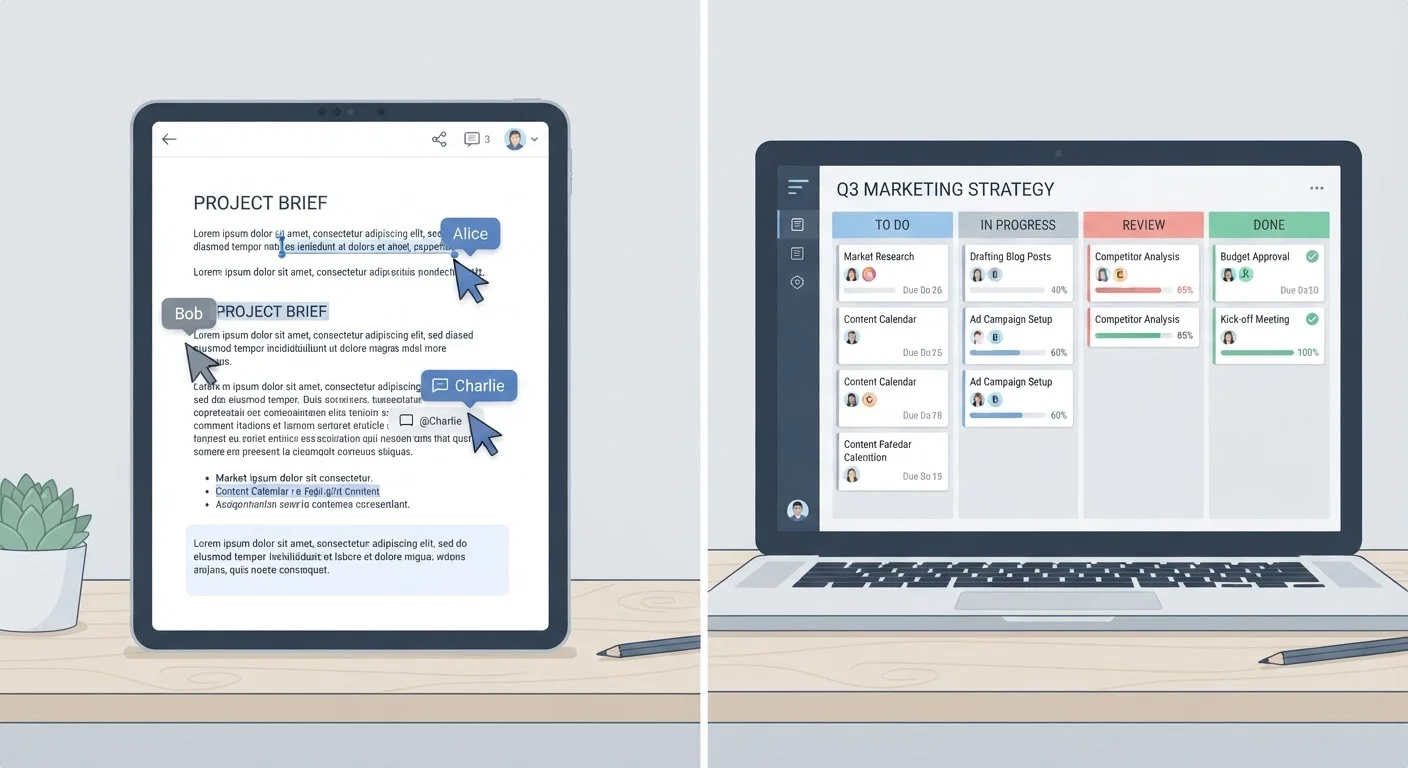
Photo credit: Telecom360.net | Connecting You To The Latest In Telecom
In this article
Docs tools and project trackers overlap more than ever. Here's how to decide which one should be your team's source of truth.
Key Takeaways
- Document tools are optimized for content creation and shared knowledge; project tools are optimized for task execution and accountability.
- Feature overlap - comments, assignments, due dates - does not mean these tool categories are interchangeable.
- Most mature teams run both categories in parallel, with clear conventions on which holds the authoritative record.
- Choosing a single source of truth reduces duplication and prevents critical work from falling through the cracks.
- The boundary question is ultimately about workflow design, not just software features.
The Overlap Problem
Document collaboration platforms increasingly include task assignments, due dates, and comment threads. Project management tools increasingly offer embedded docs, wikis, and rich-text descriptions. From a feature list alone, the two categories can appear nearly identical - and that's precisely where teams get into trouble.
The confusion isn't cosmetic. When teams default to whichever tool they opened first, work ends up split across both environments with no clear authority. Critical decisions get buried in document comment threads; project context lives in task descriptions nobody reads fully. The result is the kind of fragmentation that costs real time - as explored in our complete field guide to productivity software for teams.
Resolving this requires understanding what each category was architecturally designed to do - not just what each can technically do with add-ons.
What Document Collaboration Tools Are Actually Built For
Document collaboration tools - wikis, shared editors, knowledge bases - are optimized around the content object: a living artifact that gets drafted, revised, commented on, and eventually published or archived. Their version history, inline suggestions, and simultaneous editing features are designed for the iterative process of getting words and structure right.
These tools excel as the reference layer of a team's knowledge infrastructure: onboarding docs, product specifications, meeting notes, standard operating procedures, and research summaries. The document persists and accumulates value over time. Linking out to related documents is natural; the information architecture is built around discoverability.
What they do not do well: holding a team accountable to a deadline, surfacing which tasks are blocked, or rolling up workload across individuals. Assigning a comment to someone in a doc is a soft nudge - it carries none of the structural weight of a formal task with an owner, a due date, and a visible status. For distributed teams, the storage and access dimensions of this layer also intersect with broader infrastructure decisions - see cloud storage considerations for remote teams for relevant context.
What Project Management Software Is Actually Built For
Project management software is built around the task object: a discrete unit of work with an owner, a state, and a timeline. Its kanban boards, Gantt charts, dependency trees, and workload views are designed to answer a fundamentally different question: Is this work on track, and who is responsible?
These tools create the execution layer - where strategy and planning get translated into assigned, trackable deliverables. Status fields, milestone markers, and reporting dashboards exist because accountability requires structure that free-form documents cannot provide consistently.
| Criterion | Document Collaboration Tools | Project Management Software |
|---|---|---|
| Primary purpose | Content creation and knowledge sharing | Task execution and project tracking |
| Core unit of work | The document or page | The task or project |
| Accountability model | Shared editing, comments | Assignees, due dates, status fields |
| Progress visibility | Version history, revision tracking | Kanban, Gantt, dashboards |
| Dependency management | Minimal or absent | Core feature in most platforms |
| Long-form knowledge storage | Strong - designed for it | Limited - task descriptions only |
| Reporting and analytics | Basic or none | Workload, velocity, burndown charts |
| Typical integration role | Knowledge base, reference layer | Execution and accountability layer |
Project tools are weaker at storing and surfacing long-form context. A task description field is not a knowledge base. Teams that try to run entire project briefs, decision logs, and meeting summaries inside task descriptions find the information becomes unwieldy and hard to retrieve. This is a distinct challenge from how task managers differ from project management apps - a nuance worth understanding before selecting any tool in this space.
Drawing a Practical Boundary
The most durable operating model treats these as complementary layers, not competing choices. A useful rule of thumb: if the output is a persistent artifact meant to inform, it belongs in the document layer. If the output is a bounded deliverable with a completion state, it belongs in the project layer.
When All-in-One Platforms Blur the Lines
Several modern platforms - such as Notion, Coda, and Monday.com - deliberately combine document editing with task management in a single interface. While this reduces tool fragmentation, it can also blur ownership of the source of truth. Teams adopting these platforms still need explicit conventions about which view or page type holds authoritative project status versus reference documentation. Consolidation does not eliminate the need for workflow design; it relocates the decision into the platform's configuration.
Concretely, this means project briefs and background research live in the docs tool, linked from the relevant project in the tracker. Meeting notes and decision logs stay in the document environment; action items extracted from those meetings get promoted to the project tool with explicit owners and deadlines.
Teams evaluating whether a single platform can serve both purposes should assess whether that platform's document functionality is genuinely search-friendly and version-controlled, and whether its task functionality supports real dependency management and workload reporting. The trade-offs between all-in-one platforms and best-of-breed apps are material here - consolidation has costs as well as benefits.
54%
Workers who context-switch between tools frequently
A 2023 Asana Anatomy of Work report found over half of knowledge workers switch between apps multiple times per day, contributing to productivity loss.
2.5 hrs
Daily time spent searching for information
McKinsey research has estimated that knowledge workers spend roughly 19% of their workweek searching for and gathering information across disconnected tools.
68%
Teams using more than one productivity tool category
Surveys by productivity platform vendors consistently show most teams operate separate tools for documentation and project tracking rather than a single unified system.
Ultimately, the boundary isn't a line you draw once. It's a convention your team agrees on, documents, and revisits as workflows evolve. The technology follows the decision; the decision requires clarity about what kind of accountability each tool is expected to carry.

Author
Business Tech Editorial Team
Business Tech Editorial Team is the collective byline for our editorial team and contributor network. Articles published under this byline or an editorial pen name are researched, written, and reviewed according to our editorial standards for clarity, consistency, and independence before publication.
View all articles →