
Task Management vs. Project Management Apps: Where the Line Falls
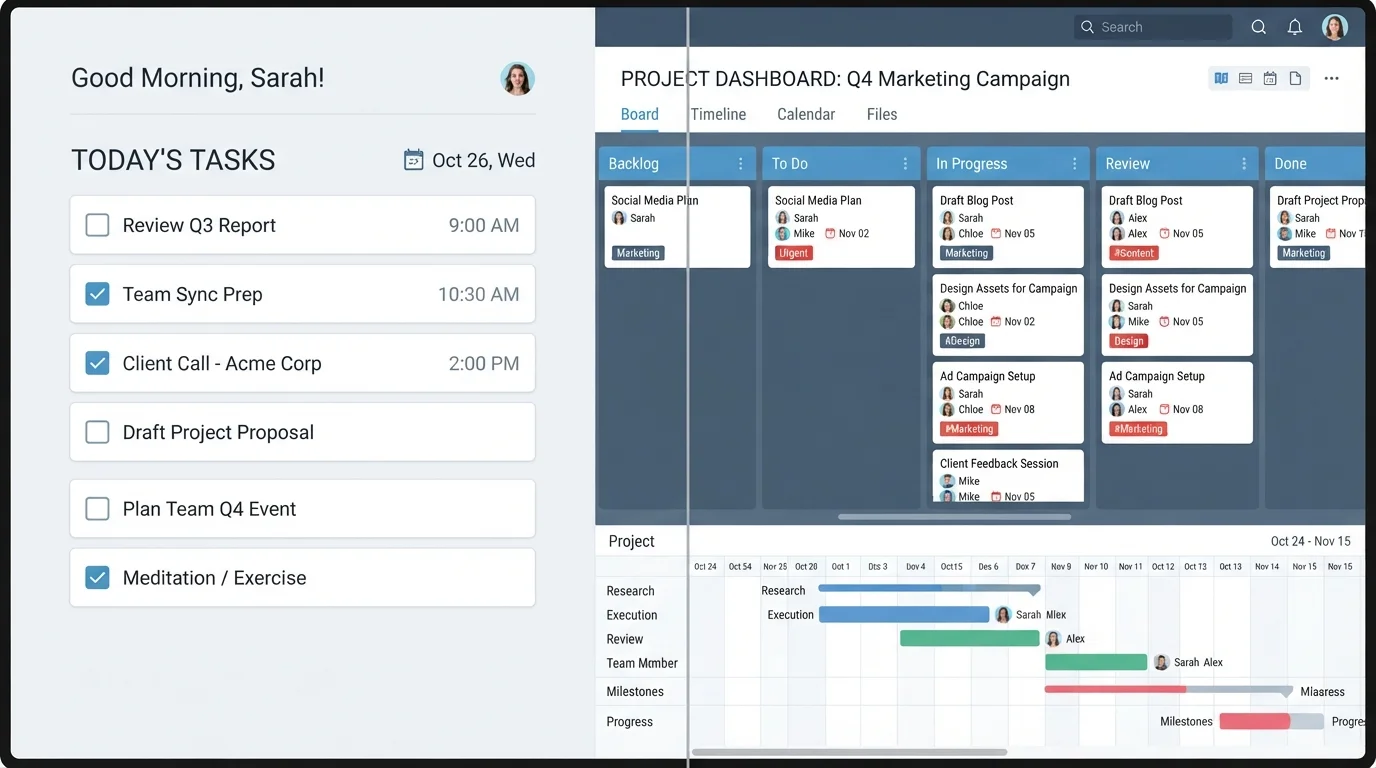
Photo credit: Telecom360.net | Connecting You To The Latest In Telecom
In this article
Task managers and project management tools overlap more than you'd think. Here's how to tell them apart and which fits your actual work style.
Key Takeaways
- Task managers focus on individual action items; project management apps coordinate interdependent work across teams.
- The boundary between the two categories is increasingly blurred, as many tools now offer features from both.
- Choosing the wrong category often creates unnecessary friction - too much tool or too little structure.
- Your team size, work complexity, and coordination needs are the clearest signals for which category fits.
- Some workflows genuinely benefit from running both tool types in parallel.
The Core Distinction: Scope and Structure
At the conceptual level, task management apps are built around the individual action item - a discrete unit of work with a title, maybe a due date, and a done/not-done state. Tools in this category prioritize speed of capture, personal organization, and frictionless completion. Think checklists, inbox-zero workflows, and priority flags.
Project management apps, by contrast, treat work as a system. They model relationships between tasks, assign ownership across team members, track progress against milestones, and often visualize work on timelines or Kanban boards with structured stages. The unit of concern isn't a single to-do - it's the outcome that a coordinated set of work is moving toward.
For a broader map of where these categories sit within the productivity app ecosystem, see The Productivity App Landscape.
| Criterion | Task Management Apps | Project Management Apps |
|---|---|---|
| Primary unit of work | Individual to-do item | Project with linked tasks |
| Typical user | Individual or small team | Cross-functional team |
| Coordination model | Informal, lightweight | Structured, role-based |
| Timeline/Gantt views | Rare or basic | Standard feature |
| Dependency tracking | Usually absent | Core capability |
| Reporting & dashboards | Minimal | Built-in and detailed |
| Setup overhead | Low - start immediately | Higher - requires planning |
| Best workflow fit | Personal productivity | Multi-phase deliverables |
Where the Categories Blur - and Why It Matters
The practical problem is that both categories have been expanding toward each other for years. Many task managers now offer subtasks, assignees, comments, and due-date groupings that look a lot like lightweight project tracking. Meanwhile, some project tools have added personal task views and quick-capture features borrowed from simpler apps.
This convergence creates genuine confusion when choosing. A tool that calls itself a "task manager" may have more project features than you need, while one marketed as a "project management platform" may be overkill for a three-person creative studio.
77%
Projects that experience scope creep
According to the Project Management Institute's Pulse of the Profession report, the majority of projects suffer scope creep - often a symptom of under-structured task tracking.
2-3x
Feature overlap between leading tools
Industry analysts at Gartner have noted that work management platforms increasingly share features across the task and project categories, making categorical distinctions harder to apply.
The more useful question isn't what category a tool belongs to - it's what your actual coordination needs are. Task management apps differ significantly under the hood, even within the same category, which makes evaluating by feature set more reliable than evaluating by label.
Signals That You Need Each Type
Several clear signals indicate which category fits your workflow:
- You need task management if: work is self-contained, team size is small, coordination happens informally (Slack, email), and speed of capture matters more than structured reporting.
- You need project management if: work has sequenced phases, tasks depend on other tasks completing first, multiple people own different parts, or stakeholders need progress visibility.
It's also worth considering whether your team might benefit from running both. Some organizations use a lightweight task app for individual daily work and a project tool for cross-functional initiatives - a pattern explored in depth in All-in-One Productivity Platforms vs. Best-of-Breed Apps.
When 'Good Enough' Is Actually Good Enough
Not every work context needs a purpose-built project management tool. Teams with simple, recurring workflows often perform well with a shared task list and clear ownership conventions. Adding formal project infrastructure to a low-complexity workflow can introduce process overhead that slows rather than supports the work. Match the tool's complexity to the actual coordination challenge - not to what sounds more professional.
Larger teams sometimes find that document collaboration tools start filling project management gaps - a boundary worth understanding separately. See Document Collaboration vs. Project Management for that comparison.

Author
Apps & Software Editorial Team
Apps & Software Editorial Team is the collective byline for our editorial team and contributor network. Articles published under this byline or an editorial pen name are researched, written, and reviewed according to our editorial standards for clarity, consistency, and independence before publication.
View all articles →