
USB Standards Decoded: USB-A, USB-C, USB 3.2, Thunderbolt, and Beyond
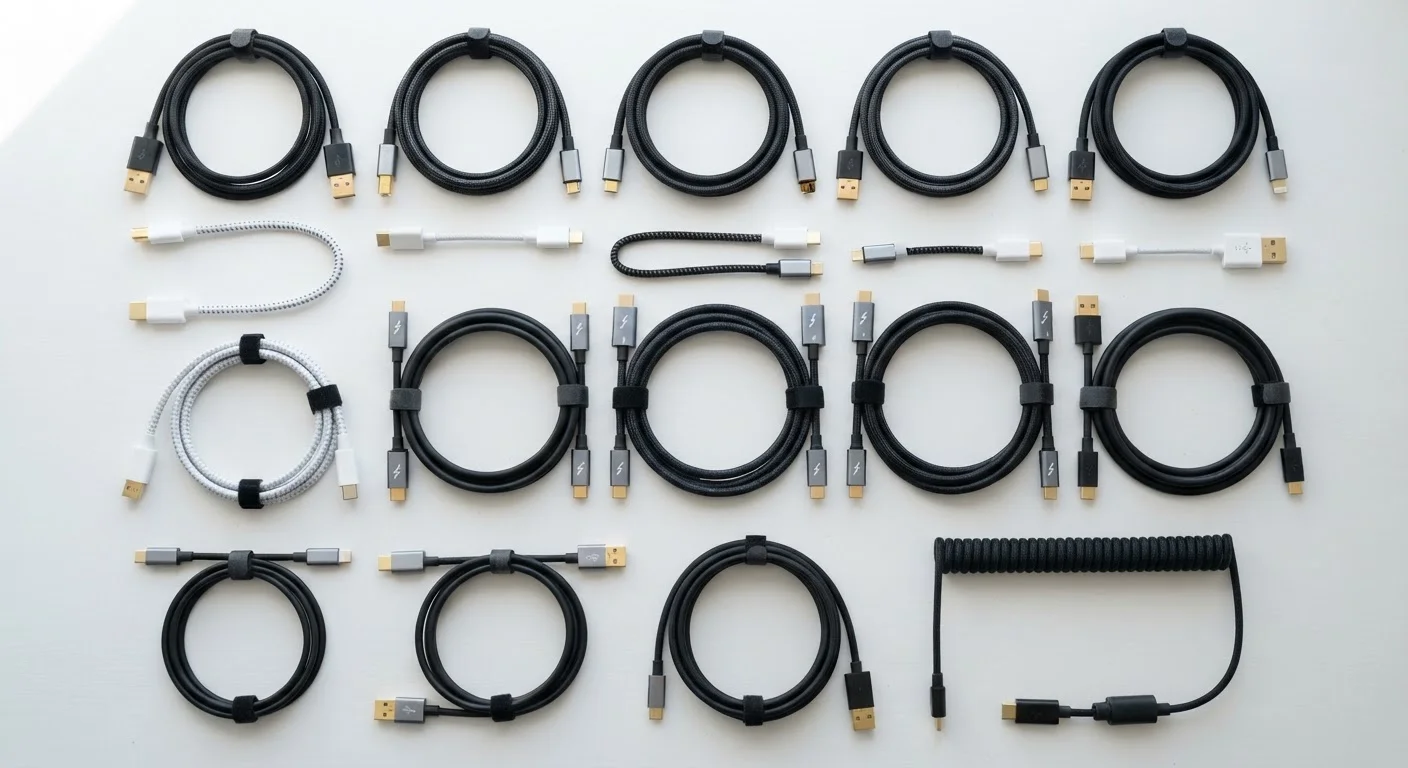
Photo credit: Telecom360.net | Connecting You To The Latest In Telecom
In this article
A clear reference guide to USB and Thunderbolt versions, what the labels mean, and which cables work with which devices.
Why USB Labels Are So Confusing
USB has evolved through decades of revisions, and the naming conventions have not kept pace with clarity. The same physical connector can carry dramatically different speeds depending on the internal wiring and host controller. Meanwhile, marketing labels like "USB 3.1 Gen 2" and "SuperSpeed+" describe overlapping capabilities under different names. This reference guide cuts through that confusion by separating two distinct things: the connector shape (the physical form factor) and the protocol version (the data transfer specification).
| Current USB specification | USB4 (Version 2.0 supports up to 80 Gbps) (USB Implementers Forum) |
| USB-C introduced | 2014 (USB 3.1 specification cycle) (USB-IF) |
| Thunderbolt 5 max bandwidth | Up to 120 Gbps (asymmetric Bandwidth Boost) (Intel Thunderbolt 5 specification) |
| USB PD 3.1 max wattage | 240W (Extended Power Range) (USB-IF USB PD 3.1 specification) |
| Thunderbolt 4 minimum display support | Two 4K displays or one 8K display (Intel Thunderbolt 4 specification) |
| USB 2.0 max speed | 480 Mbps (USB-IF) |
Connector Types: Shape Is Not the Same as Speed
Understanding the physical connector is the first step. The shape tells you what will physically plug in - nothing more.
- USB-A
- The rectangular connector most people recognize. Found on chargers, flash drives, and older peripherals. USB-A is the host-side connector on most desktop computers and hubs.
- USB-B
- The squarish connector historically used on printers and external hard drives. Still present in some professional audio and lab equipment.
- Micro-USB
- A smaller connector common on Android phones and accessories before approximately 2017. Largely superseded by USB-C in consumer devices.
- USB-C
- An oval, reversible connector used on modern smartphones, laptops, tablets, and peripherals. USB-C is a connector shape - it does not guarantee any specific transfer speed on its own.
The critical takeaway: a USB-C cable may carry USB 2.0 speeds (480 Mbps) or USB 3.2 Gen 2×2 speeds (20 Gbps) depending entirely on the cable's internal wiring and the devices at each end. The connector shape is not the speed guarantee.
USB-IF
The USB Implementers Forum, the industry standards body responsible for defining and certifying USB specifications. Member companies include major chip and device manufacturers.
USB Power Delivery (USB PD)
A charging specification layered on top of USB that allows negotiation of higher voltages and currents. USB PD 3.1 supports up to 240W over a compatible USB-C cable.
Thunderbolt
A hardware interface developed by Intel using the USB-C physical connector (from version 3 onward). It provides higher guaranteed bandwidth and stricter certification requirements than standard USB.
Tunneling
The technique USB4 and Thunderbolt use to carry non-USB protocols - such as DisplayPort video or PCIe data - through the same cable and connector alongside USB traffic.
Active Cable
A cable containing integrated signal-boosting electronics, required for high-speed USB or Thunderbolt connections over longer distances than passive copper wiring can reliably support.
Gen 2×2
A USB 3.2 sub-specification that bonds two 10 Gbps lanes together to achieve 20 Gbps total throughput. Requires a USB-C connector and a cable supporting this configuration.
Protocol Versions: What the Numbers Actually Mean
USB protocol versions define maximum data transfer bandwidth and power delivery capability. The USB Implementers Forum (USB-IF) has revised the naming scheme multiple times, creating legacy confusion.
| Marketing Name | Official Name | Max Speed | Common Uses |
|---|---|---|---|
| USB 2.0 / Hi-Speed | USB 2.0 | 480 Mbps | Keyboards, mice, basic storage |
| USB 3.0 / USB 3.1 Gen 1 / USB 3.2 Gen 1 | USB 3.2 Gen 1 | 5 Gbps | Flash drives, external HDDs |
| USB 3.1 Gen 2 / USB 3.2 Gen 2 | USB 3.2 Gen 2 | 10 Gbps | Fast SSDs, video capture |
| USB 3.2 Gen 2×2 | USB 3.2 Gen 2×2 | 20 Gbps | High-speed NVMe enclosures |
| USB4 Gen 2×2 | USB4 20 | 20 Gbps | Docks, displays, fast storage |
| USB4 Gen 3×2 | USB4 40 | 40 Gbps | High-res displays, pro storage |
USB4 - note the absence of a space - is the current generation specification. It requires USB-C connectors and supports tunneling of DisplayPort and PCIe protocols, enabling docks and multi-device hubs without separate cables. See our guide to tech accessories that improve daily digital life for practical guidance on choosing docks and hubs built on these standards.
USB4 vs. USB 4.0: Naming Matters
The specification is officially written as "USB4" without a space - distinct from the older "USB 3.2" and "USB 2.0" naming style. The USB-IF introduced this format starting with the USB4 specification in 2019. When reading product listings, watch for inconsistent spacing, which can sometimes indicate misrepresentation of the supported standard.
Thunderbolt: Intel's Superset Protocol
Thunderbolt is a hardware interface developed by Intel (in collaboration with Apple) that uses the USB-C connector from Thunderbolt 3 onward. It is a superset of USB - Thunderbolt ports accept standard USB-C devices, but USB-C ports do not necessarily support Thunderbolt peripherals.
40 Gbps
Thunderbolt 3 and 4 maximum bandwidth
Both Thunderbolt 3 and 4 share a 40 Gbps ceiling, though Thunderbolt 4 enforces stricter minimum capability requirements per the Intel specification.
120 Gbps
Thunderbolt 5 peak asymmetric bandwidth
Thunderbolt 5 can reach 120 Gbps receive bandwidth using Bandwidth Boost mode, primarily benefiting high-resolution display output scenarios per Intel's specification.
240W
Maximum USB Power Delivery wattage
USB PD 3.1 Extended Power Range enables up to 240W over a certified USB-C cable, sufficient for high-performance laptop charging per the USB-IF specification.
Thunderbolt version summary:
- Thunderbolt 3: 40 Gbps, USB-C connector, supports up to two 4K displays or one 5K display, 100W power delivery
- Thunderbolt 4: Also 40 Gbps, but with stricter minimum requirements: mandatory dual-4K or single-8K display support, PCIe 3.0 ×4 tunneling, Intel VT-d-based DMA protection
- Thunderbolt 5: Up to 120 Gbps asymmetric bandwidth (via Bandwidth Boost), supports 240W USB PD charging, and enables 8K display output without compression
A Thunderbolt 4 cable certified by Intel is also a fully compliant USB4 Gen 3×2 cable, making it broadly useful even with non-Thunderbolt devices. Always look for the Thunderbolt lightning-bolt logo on both the cable and port when pairing for maximum capability.
Choosing the Right Cable for Your Setup
Cable quality matters as much as the version label. Passive USB-C cables supporting speeds above 10 Gbps or lengths beyond about one meter typically require active electronics inside the cable to maintain signal integrity. Key practical rules:
- For charging only, any USB-C cable rated for the required wattage is sufficient - speed rating is irrelevant.
- For connecting an external NVMe drive at full speed, verify the cable and enclosure both specify the same USB 3.2 Gen or USB4 tier.
- Thunderbolt cables are not universally interchangeable with USB4 cables, even though both use USB-C connectors - check certification markings.
- USB Power Delivery (USB PD) negotiation happens independently of data speed; a USB 2.0 cable can carry 240W charging if it meets the USB PD 3.1 Extended Power Range specification.
When in doubt, check the specification sheet of both the cable and the host device rather than relying on the connector shape alone. Manufacturers are required to disclose supported protocols, though this information is sometimes buried in technical documentation rather than product packaging.

Author
Consumer Electronics Editorial Team
Consumer Electronics Editorial Team is the collective byline for our editorial team and contributor network. Articles published under this byline or an editorial pen name are researched, written, and reviewed according to our editorial standards for clarity, consistency, and independence before publication.
View all articles →