
Tech Accessories That Actually Improve Daily Digital Life
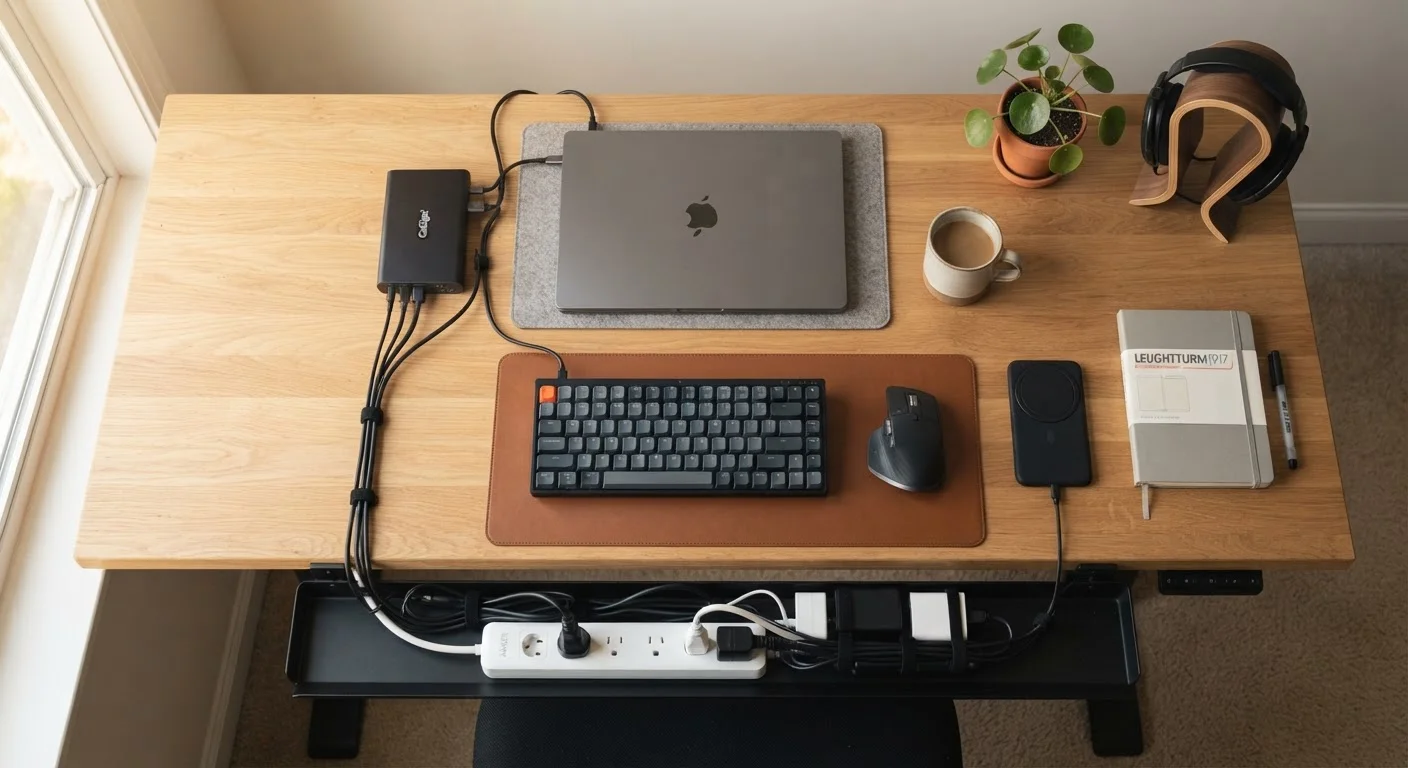
Photo credit: Telecom360.net | Connecting You To The Latest In Telecom
In this article
A curated look at accessory categories — docks, cable managers, surge protectors, and more — and the role each plays.
Key Takeaways
- A quality USB-C dock can consolidate connectivity for multiple devices through a single cable.
- Surge protectors do more than prevent power damage - joule ratings and response time matter.
- Cable management accessories reduce physical clutter and lower the risk of connection failures.
- Wireless charging pads vary significantly in output wattage, affecting real-world charging speed.
- Ergonomic monitor stands and laptop risers meaningfully reduce fatigue during extended screen sessions.
Why Accessories Deserve More Scrutiny Than They Usually Get
Most people spend considerable time researching their primary devices - smartphones, laptops, tablets - and comparatively little evaluating the accessories built around them. Yet a poorly chosen surge protector can leave hardware exposed to voltage spikes, and a USB hub with mismatched power delivery specs can slow charging or corrupt data transfers mid-session.
Accessories define how seamlessly your devices integrate into everyday routines. The categories covered below each address a specific friction point in the modern digital workspace, whether at home or in a hybrid office setup. Understanding what each category actually does - and which specifications matter - is more useful than chasing brand names or price tags.
For context on how device ecosystems extend beyond hardware, see our coverage on wired vs. wireless trade-offs and the smartphones and tablets hub for device-level specs that inform accessory compatibility.
USB-C Docks and Hubs
A USB-C dock acts as a central connectivity bridge, expanding a single port into multiple display outputs, USB-A slots, SD card readers, Ethernet, and power delivery passthrough. The key specifications to evaluate are power delivery wattage (typically 60W-100W for laptop charging), display resolution support (4K at 60Hz vs. 30Hz matters noticeably), and whether the hub draws bus power or requires its own power adapter.
Thunderbolt-certified docks offer higher bandwidth ceilings and daisy-chaining capability, though they come at a premium and require compatible host ports. Understanding the underlying standards is essential - our USB standards guide breaks down the differences between USB 3.2, Thunderbolt 3, and Thunderbolt 4 in practical terms.
A dock's power delivery wattage and display resolution ceiling matter far more than port count alone.
Surge Protectors and Power Conditioning
Surge protectors are often treated as interchangeable commodities, but the variation between models is significant. The joule rating indicates total energy absorption capacity before the unit fails to protect - consumer-grade models typically range from 400 to 3,000+ joules. The clamping voltage (the threshold at which the device begins diverting excess voltage) should ideally be 400V or lower.
Some higher-end units include EMI/RFI filtering, which can reduce electrical noise affecting sensitive audio equipment or networked devices. Units with indicator lights showing protection status give useful feedback - a surge protector that has absorbed its capacity limit offers no further protection, even if it still passes power.
A surge protector with a depleted joule capacity still passes electricity - but no longer protects your hardware.
Cable Management Systems
Cable clutter is more than an aesthetic issue. Cables under repeated tension or bend stress degrade faster, and tangled setups make it difficult to identify connection problems. Cable management accessories span a wide range: desk-mounted trays that route power strips off surfaces, adhesive clips for routing along desk edges, hook-and-loop fasteners for bundling, and under-desk cable raceways for permanent installations.
The practical priority is keeping cable runs short, avoiding sharp bends at connector ends, and ensuring cables aren't supporting their own weight over long drops. Ferrite chokes - small cylindrical clips attached near cable ends - can reduce electromagnetic interference on data and audio cables in environments with dense electronics.
Cables under repeated mechanical stress fail earlier - proper routing is a maintenance decision, not just aesthetics.
Wireless Charging Pads and Multi-Device Stands
Wireless charging has matured considerably, but output wattage remains highly variable. Standard Qi charging tops out around 5W-7.5W for many devices; proprietary fast-charge implementations from various manufacturers can reach 15W or higher - but only when paired with compatible chargers and cables. Using a generic pad with a device that supports higher wattage simply results in slower charging, not damage.
Multi-device stands that simultaneously charge a phone, wireless earbuds, and a smartwatch reduce cable dependency significantly. Alignment matters physically - coil positioning affects charging efficiency, which is why some pads perform inconsistently with bulkier cases.
Wireless charging speed is capped by the lower-rated device or charger in the pairing - not the higher one.
Monitor Stands and Laptop Risers
Display height directly affects posture. General ergonomic guidance from occupational health organizations suggests the top of a monitor should sit at or slightly below eye level when seated, with the screen approximately arm's length away. A monitor stand or adjustable arm that positions screens correctly reduces neck and upper back strain during long sessions.
Laptop risers serve a secondary function for those using an external keyboard: elevating the laptop screen to monitor height transforms it into a practical secondary display rather than a low-angle distraction. Stands with integrated USB hubs or cable routing channels add utility without additional desk footprint.
Correct monitor height reduces cervical strain - a stand is an ergonomic investment, not a decorative one.
Privacy Screens and Monitor Filters
Privacy filters use micro-louver technology to narrow the viewing angle of a screen to roughly 60 degrees - visible straight-on but appearing dark from the sides. This is relevant in shared workspaces, cafés, or anywhere sensitive information is displayed. They attach via adhesive strips or slide-on frames and are available for laptops, tablets, and external monitors.
One trade-off: privacy filters typically reduce maximum screen brightness by 30-50%, which can create eye strain in brighter environments. Matte privacy filters also serve as anti-glare surfaces, which can be independently useful in high-ambient-light settings. For a broader look at protecting the devices that use these accessories, the guide on device security across phones, laptops, and tablets covers complementary strategies.
Privacy filters reduce brightness noticeably - factor ambient lighting conditions into the decision before purchasing.
Building a Smarter Accessory Stack
No single accessory transforms a workflow on its own. The real gains come from a coherent stack - a dock that handles video output and charging, a surge protector with adequate joule capacity, and cable management that keeps the physical environment functional over time.
Match Specs to Your Actual Hardware
Before purchasing any accessory, cross-reference its specifications against your device's documentation - particularly for USB-C docks and wireless chargers, where compatibility gaps are common. Manufacturer spec sheets are more reliable than retail listings, which often use marketing language that obscures real technical limits. A few minutes of verification avoids accessories that underperform or don't function at all with your specific hardware.
Accessories also interact with software and cloud infrastructure. A reliable power setup protects the devices you depend on for tasks like those covered in our guide to practical cloud storage scenarios, and a clean, ergonomic workspace supports the kind of focused sessions where productivity apps deliver the most value.
The goal is deliberate selection - knowing what problem each accessory solves and verifying that its specifications match your actual hardware and usage patterns before committing.

Author
Consumer Electronics Editorial Team
Consumer Electronics Editorial Team is the collective byline for our editorial team and contributor network. Articles published under this byline or an editorial pen name are researched, written, and reviewed according to our editorial standards for clarity, consistency, and independence before publication.
View all articles →