
Object Storage, Block Storage, File Storage: What Each One Actually Does
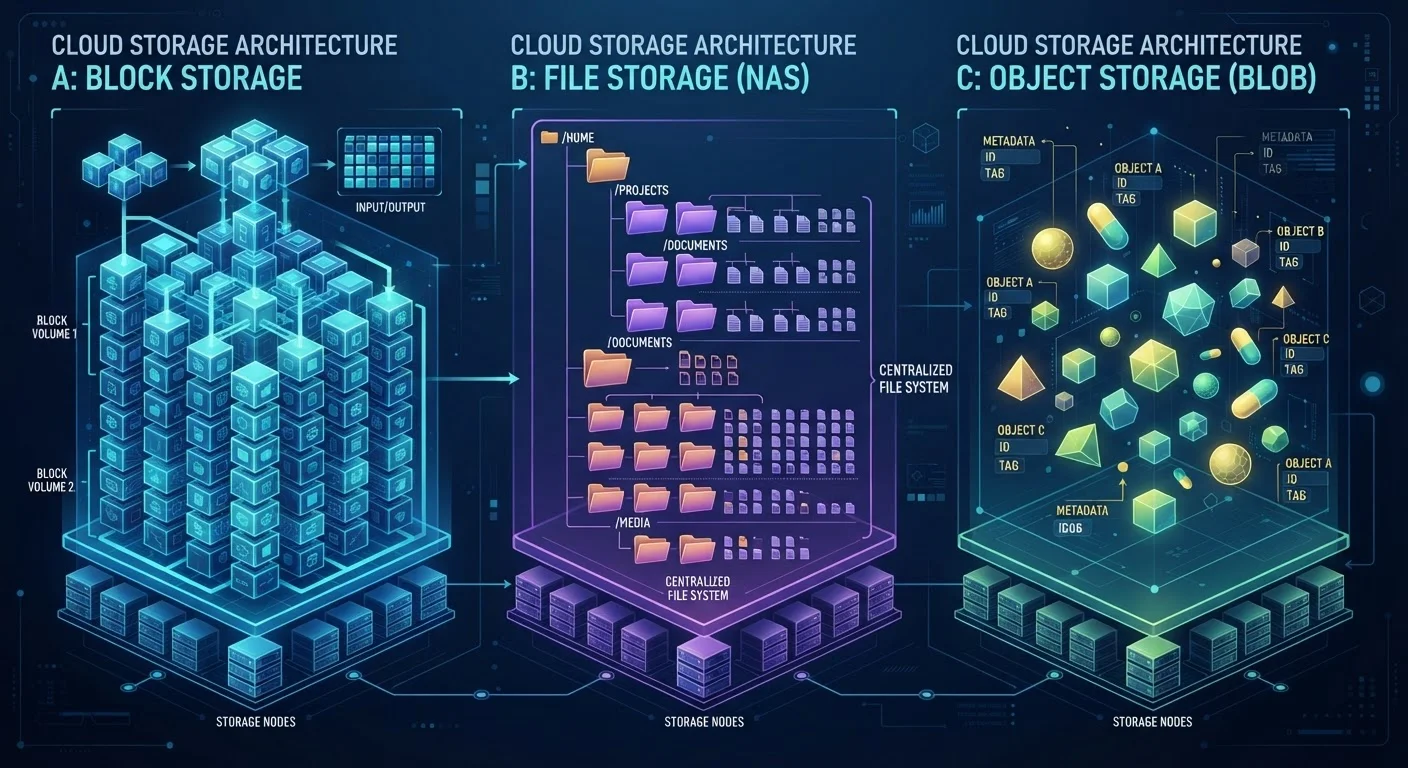
Photo credit: Telecom360.net | Connecting You To The Latest In Telecom
In this article
Three cloud storage architectures with very different purposes. A clear breakdown of when and why each type is used.
Key Takeaways
- Block storage divides data into fixed-size chunks, making it ideal for databases and virtual machines requiring low-latency access.
- File storage organizes data in a familiar folder hierarchy, best suited for shared network drives and collaboration.
- Object storage treats each file as a self-contained unit with metadata, optimized for massive-scale unstructured data like media and backups.
- The right storage type depends on how the data will be accessed, not just how much storage space is needed.
- Most cloud environments use all three types simultaneously, each serving a different layer of the application stack.
Why Storage Architecture Matters
When people talk about "cloud storage," they often mean the experience - uploading a photo, syncing a document, or backing up a drive. But underneath that experience, cloud providers offer fundamentally different storage architectures, each designed for a specific class of problem. Choosing the wrong one doesn't just affect performance; it can create real bottlenecks in how applications function at scale.
The three dominant types - block storage, file storage, and object storage - are not interchangeable. They differ in how data is organized, how it's accessed, and what kinds of workloads they handle well. For a deeper look at how cloud storage works at the infrastructure level, see what actually happens when you upload a file.
Block Storage: Raw Performance for Demanding Workloads
Block storage treats data as a collection of fixed-size chunks, called blocks, each with its own address. The storage layer has no awareness of what the data means - it just reads and writes blocks on demand. The operating system or application sitting above it handles the file system logic.
This low-level design is what makes block storage fast. Because there's no overhead from metadata parsing or directory traversal, read/write latency is minimal. That's why block storage is the standard choice for:
- Relational databases that require consistent, sub-millisecond response times
- Virtual machine (VM) disks, where the OS needs direct, exclusive access to storage
- High-throughput applications like transaction processing systems
The trade-off is that block storage is not inherently shareable. Typically, one server or VM mounts a block volume at a time. It's also generally more expensive per gigabyte than the other types, reflecting its performance premium.
Match Storage to Access Patterns
Before provisioning any storage type, map out how data will be read and written. High-frequency random reads and writes point to block storage. Regular shared access by a team points to file storage. Infrequent retrieval of large files or datasets at scale points to object storage. Matching the architecture to the access pattern avoids paying a performance or cost premium unnecessarily.
File Storage: Familiar Structure, Built for Sharing
File storage organizes data exactly the way most people think about storage: files inside folders, inside folders, in a hierarchy. Access is governed by standard protocols like NFS or SMB, which are the same protocols used by traditional network-attached storage (NAS) devices.
Because multiple users or systems can connect simultaneously, file storage is well-suited to shared workflows - development teams accessing the same code repository, media editors reading from a shared drive, or office environments with centralized document storage. It maps naturally to human intuition about how files are organized.
The limitations emerge at scale. File storage systems can struggle when the number of files or concurrent connections grows very large, and the hierarchical structure adds latency compared to block storage. It's also less flexible than object storage when it comes to distributing data across geographically dispersed locations.
For context on how personal versus organizational storage needs diverge, see personal vs. business cloud storage differences.
Object Storage: Scale and Metadata at the Core
Object storage abandons the folder hierarchy entirely. Instead, each piece of data - called an object - is stored as a flat unit alongside a rich set of metadata and a unique identifier. There are no directories; retrieval happens via API calls using that identifier, typically over HTTP.
This flat architecture is what makes object storage extraordinarily scalable. Systems can hold billions of objects without performance degrading the way a deeply nested folder structure would. The embedded metadata also enables powerful features: tagging objects by content type, setting lifecycle rules to automatically archive or delete data after a set period, and enabling fine-grained access control per object.
Common object storage use cases include:
- Storing images, videos, and audio files served to web and mobile apps
- Data lake storage for analytics workloads
- Long-term backups and archival data
- Static website hosting and content delivery
Object Storage Is Not a Drop-In Replacement
Despite its low cost and scalability, object storage cannot replace block or file storage in all contexts. Applications that expect a mounted file system or that modify files frequently will not function correctly with object storage. Migrating workloads to object storage without validating application compatibility can cause data integrity issues or application failures.
Object storage is not appropriate for workloads that require frequent, in-place updates to data - such as databases - because objects are typically written whole and replaced, not modified incrementally.
How the Three Types Compare
These architectures are not competing for the same role - they coexist within most modern cloud deployments. A typical application might use block storage for its database, file storage for shared configuration files, and object storage for user-uploaded media. Understanding which layer handles which job is a foundation of sound cloud architecture.
| Block Storage | File Storage | Object Storage | |
|---|---|---|---|
| Data organization | Fixed-size blocks, no file system | Hierarchical folders and files | Flat namespace with unique IDs |
| Access method | Direct I/O via OS | NFS / SMB protocols | HTTP API calls |
| Typical latency | Very low (sub-millisecond) | Low to moderate | Higher (network round-trip) |
| Scalability | Limited to volume size | Moderate, degrades with scale | Virtually unlimited |
| Best use case | Databases, VMs | Shared drives, NAS | Media, backups, data lakes |
| Concurrent access | Typically single-mount | Multi-user by design | Multi-user via API |
| Relative cost per GB | Higher | Moderate | Lower |
For broader context on how cloud and local storage trade-offs factor into these decisions, see cloud storage vs. local storage trade-offs. And if you're building familiarity with cloud storage terminology more broadly, the cloud storage glossary is a useful reference.

Author
AI & Cloud Editorial Team
AI & Cloud Editorial Team is the collective byline for our editorial team and contributor network. Articles published under this byline or an editorial pen name are researched, written, and reviewed according to our editorial standards for clarity, consistency, and independence before publication.
View all articles →