
Native, Web, and Hybrid Apps: What Sets Them Apart
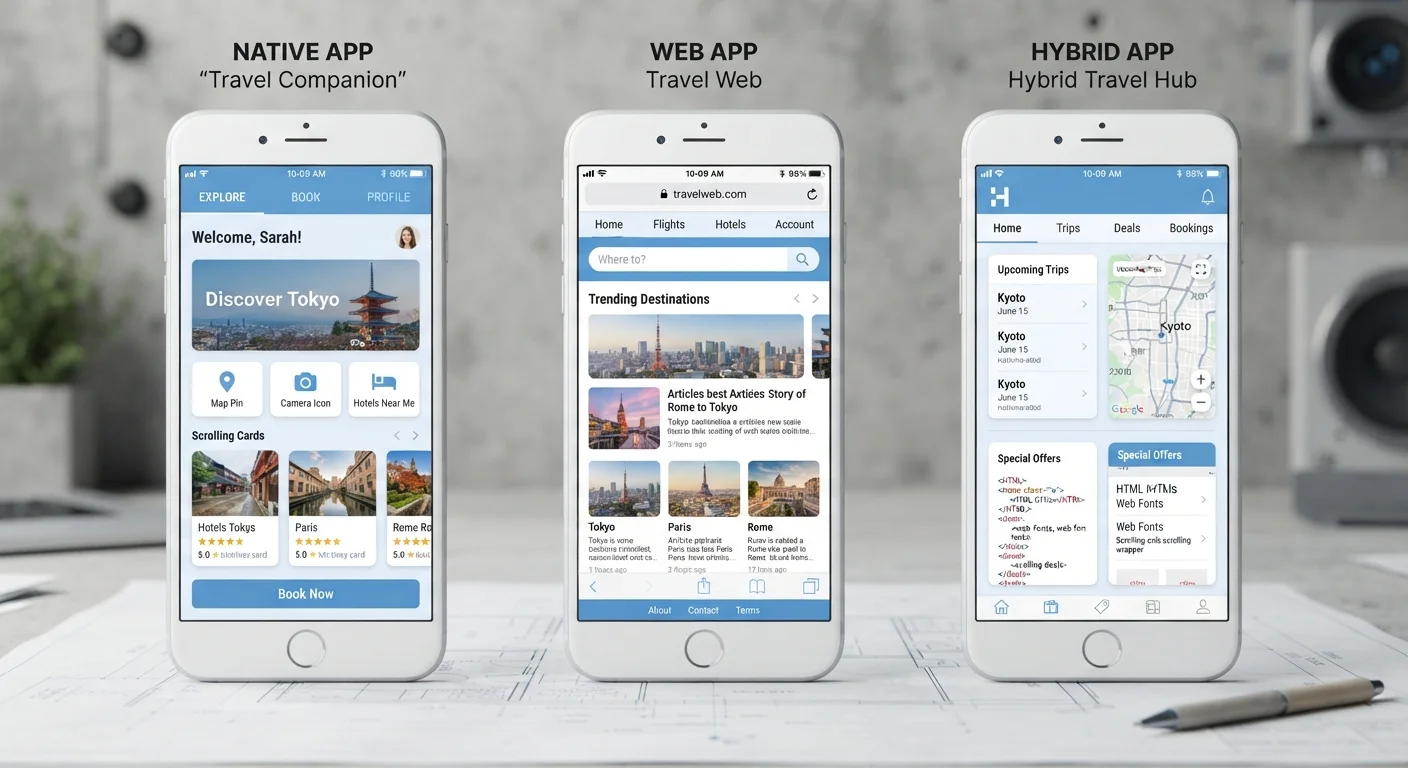
Photo credit: Telecom360.net | Connecting You To The Latest In Telecom
In this article
Understand the three main app architectures, how each is built, and why the distinction matters for performance and experience.
Key Takeaways
- Native apps are built specifically for one platform and generally deliver the best performance and device integration.
- Web apps run inside a browser and require no installation, but have limited access to hardware features.
- Hybrid apps sit between both worlds, using a single codebase wrapped in a native shell.
- The architecture behind an app directly affects speed, offline capability, and how updates are delivered.
- Most users interact with all three types daily without realizing the underlying difference.
The Three Architectures, Defined
When you open an app on your phone, you're probably not thinking about how it was built. But the underlying architecture shapes nearly every aspect of the experience - how fast it loads, whether it works offline, and even how bugs get fixed.
Native apps are written using the programming languages and tools specific to one operating system. iOS native apps are typically built with Swift or Objective-C; Android native apps use Kotlin or Java. Because they're compiled directly for the platform, they can tap into hardware features like the camera, GPS, Face ID, and push notifications at a deep level. The trade-off is that a separate codebase is generally needed for each platform.
Web apps are essentially websites engineered to behave like applications. They run inside a mobile browser using HTML, CSS, and JavaScript, and require no installation - users simply navigate to a URL. Progressive Web Apps (PWAs) are an advanced form that can be saved to the home screen and even work offline to a limited degree, though hardware access remains constrained by what browsers expose.
Hybrid apps combine both approaches: developers write a single codebase - typically using frameworks like React Native, Flutter, or Ionic - that is then wrapped in a native container and distributed through app stores. The core functionality often runs in a web-based layer, but the shell allows access to some native APIs. See our explanation of why the same app feels different across platforms for more on how these layers affect daily use.
How Architecture Affects Performance and Experience
For everyday users, architecture translates directly into observable behavior.
Native apps typically deliver smoother animations, faster load times, and more reliable access to sensors and hardware. This is why graphics-intensive games, camera tools, and banking apps are almost universally native - those categories demand tight integration with the OS and hardware.
Web apps excel in accessibility and update speed. Because everything runs through a browser, there's no App Store review process; changes can go live immediately. For lightweight tools - a scheduling page, a simple form, a document viewer - this is often sufficient. The limitation is meaningful: web apps cannot access Bluetooth, NFC, or background processing in the same way native apps can, and their performance degrades noticeably under heavy computational load.
Hybrid apps occupy a pragmatic space. A single development team can ship to both iOS and Android, which reduces cost and time to market. Modern hybrid frameworks have closed much of the performance gap with native, though subtle differences in animation smoothness and startup time can still surface - particularly on older devices. How software choices directly affect device speed and reliability is worth understanding if you notice an app performing inconsistently across devices.
| Native Apps | Web Apps | Hybrid Apps | |
|---|---|---|---|
| Platform | iOS or Android (separate builds) | Any browser, any OS | iOS and Android (shared codebase) |
| Installation | Required via app store | None - browser only | Required via app store |
| Performance | Highest | Lowest under heavy load | Near-native on modern devices |
| Hardware Access | Full (camera, GPS, NFC, etc.) | Limited by browser APIs | Partial, via native wrapper |
| Update Speed | Store review required | Instant server-side push | Store review (some JS updates exempt) |
| Offline Capability | Full, by design | Limited (PWA partial support) | Partial, depends on framework |
| Development Cost | Higher (per platform) | Lower | Moderate (single codebase) |
Distribution, Updates, and Maintenance
How an app reaches your device - and stays current - differs significantly by type.
Native and hybrid apps are both distributed through platform stores (the App Store and Google Play). That means each update goes through a review process that can take anywhere from hours to days. This gatekeeping adds a security layer but also means critical bug fixes aren't instant. Users who don't update automatically may run older, vulnerable versions.
Web apps bypass this entirely. A developer pushes a change to the server, and every user sees it on next load. This is why web apps are common in enterprise environments where rapid iteration and centralized control matter more than pixel-perfect native UI. For context on how businesses weigh these deployment factors, enterprise mobile considerations often intersect with app architecture choices around security and management.
Check the URL Bar for a Quick Clue
If you're unsure whether you're using a web app or a native one, look at your phone's status bar. Web apps open inside your browser - you'll see a URL bar or browser chrome. Native and hybrid apps fill the full screen without a browser address bar. This simple check tells you which type of app you're dealing with and helps frame your expectations around permissions and offline behavior.
The full picture of how apps evolve - from launch through eventual deprecation - is explored in our guide to the full lifecycle of a mobile app. Architecture decisions made at launch often determine how easily an app can be maintained years down the line.
What This Means for You as a User
Recognizing app type helps set realistic expectations. If a web app lacks the camera integration you expected, that's a structural limitation - not a bug. If a hybrid app feels slightly less fluid than its native counterpart on a budget Android device, that's the performance trade-off of a shared codebase becoming visible.
It also helps when something goes wrong. Native app crashes often require a full store update to fix. Web app glitches may resolve simply by refreshing or clearing browser cache. Hybrid apps can sometimes push JavaScript-level updates without a full store release, depending on how they're configured - though platform policies set limits on this.
Understanding the architecture beneath an app is also useful when evaluating privacy. Native and hybrid apps installed from stores request permissions explicitly (camera, location, contacts). Web apps, constrained by the browser sandbox, request far fewer permissions by design - which may be a feature or a limitation depending on your use case. For a deeper look at how operating system architecture shapes these permission models, see how Android and iOS handle security and hardware access differently.

Author
Apps & Software Editorial Team
Apps & Software Editorial Team is the collective byline for our editorial team and contributor network. Articles published under this byline or an editorial pen name are researched, written, and reviewed according to our editorial standards for clarity, consistency, and independence before publication.
View all articles →