
The Anatomy of a Business Workflow Automation
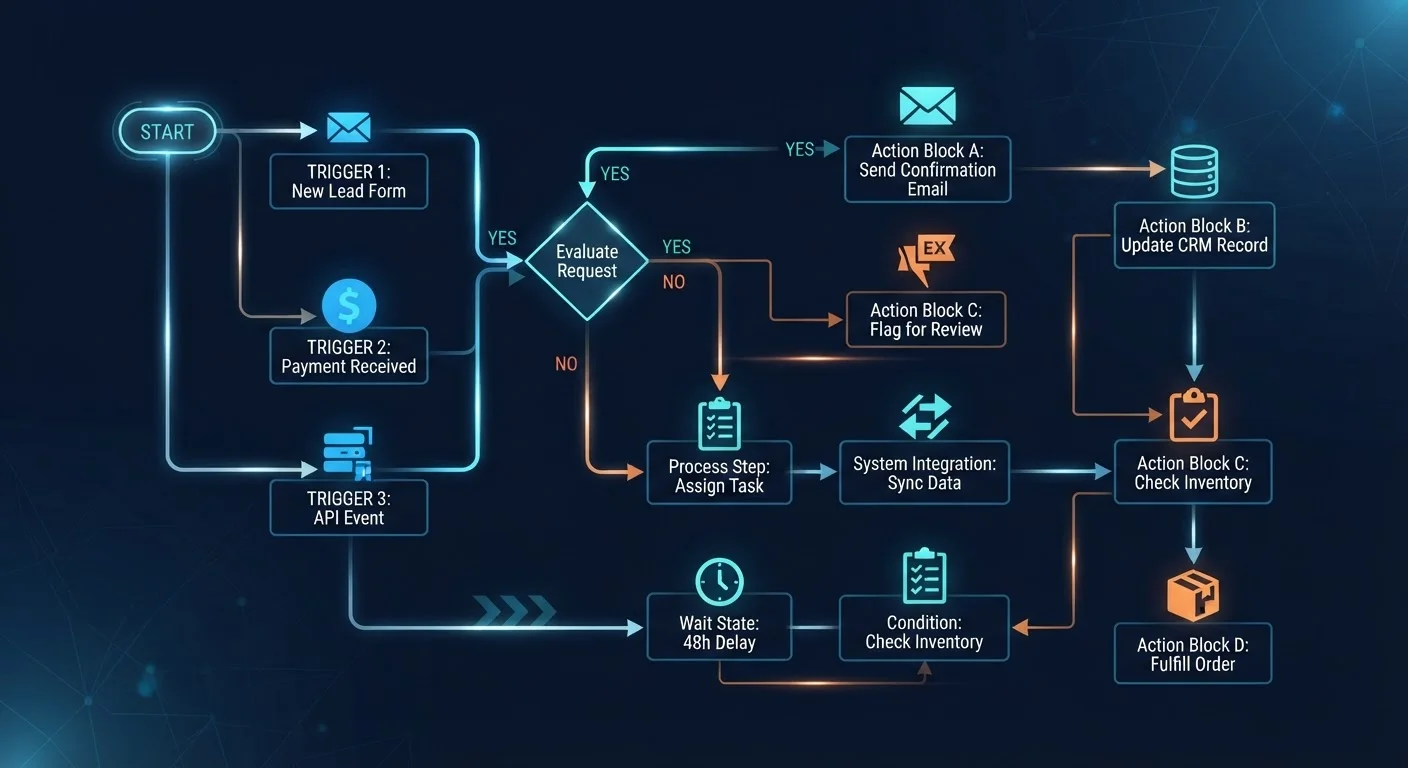
Photo credit: Telecom360.net | Connecting You To The Latest In Telecom
In this article
Triggers, actions, conditions, and loops — understand the building blocks of workflow automation before you build your first one.
Key Takeaways
- Every workflow automation is built from four core components: triggers, conditions, actions, and loops.
- Triggers are the starting event; without a valid trigger, no automation runs.
- Conditions act as logical gatekeepers, routing work based on data values or context.
- Actions are the actual work performed - sending, updating, creating, or notifying.
- Loops and branches allow a single workflow to handle complex, variable business logic.
- Understanding these building blocks helps you design automations that are reliable and easy to maintain.
The Four Core Components
Every business workflow automation - regardless of the platform or industry - is composed of the same four structural elements: triggers, conditions, actions, and loops or branches. Understanding each role is a prerequisite before building any automation of real-world complexity. See how these concepts connect to the workflow methodologies behind popular productivity tools to ground this in practical context.
A trigger is the initiating event. It answers the question: what causes this workflow to start? Triggers can be time-based (run every Monday at 8 a.m.), event-based (a new row is added to a spreadsheet), or webhook-based (an external system sends a data payload). No trigger, no automation - it is the entry point for everything that follows.
Conditions are logical filters applied after the trigger fires. They evaluate whether the incoming data meets specific criteria before any action is taken. A condition might check whether an order value exceeds a threshold, whether a contact is tagged with a particular label, or whether a file type matches a required format. Conditions prevent automations from executing on irrelevant inputs.
Actions are the work the automation actually performs: sending a notification, creating a task, updating a database record, or posting to a channel. Actions can be chained sequentially or run in parallel depending on the engine's capabilities.
Loops and branches introduce decision logic and repetition. A branch splits the path based on a true/false condition; a loop repeats an action for each item in a list - for example, processing every line item in a purchase order individually.
94%
Workers performing repetitive, automatable tasks
A McKinsey Global Institute analysis found that 94% of workers surveyed spent time on repetitive, rule-based tasks that are candidates for automation.
60-70%
Share of work activities with automation potential
McKinsey estimates that 60-70% of employee time across industries is spent on activities that could be automated with current technology.
3.5 hours
Average time saved per worker per week via automation
Salesforce's State of IT report indicated that automation tools saved employees an average of 3.5 hours per week on manual, repetitive tasks.
How Triggers Define the Automation's Scope
The trigger choice fundamentally shapes what your automation can and cannot do. Selecting a trigger that fires too broadly results in wasted processing and potential data errors. A trigger that is too narrow may miss valid events entirely.
Common trigger categories in business automation platforms include:
- Schedule triggers: Run at fixed intervals - hourly, daily, weekly - independent of any other system activity.
- Record triggers: Fire when a specific record is created, updated, or deleted in a connected app (e.g., a CRM deal moves to 'Closed Won').
- Form or submission triggers: Activate when a user completes a web form, survey, or intake process.
- Webhook triggers: Respond to HTTP POST signals sent by external systems in real time.
- Email triggers: Initiate based on inbound email characteristics - sender, subject keywords, or attachment presence.
Choosing the right trigger type requires clarity on the data source and the latency requirement. A time-sensitive client escalation demands a real-time webhook or record trigger, not a once-daily schedule. This decision also affects how you evaluate automation-capable productivity apps for integration depth.
Map Your Process Before You Build
Before configuring any automation tool, document the manual steps in the process you want to automate. Identify the exact trigger event, every decision point a human currently makes, and the final output required. Automations built on poorly understood processes replicate existing inefficiencies at scale.
Conditions, Actions, and Error Handling in Practice
Conditions transform a simple trigger-action pair into a genuinely intelligent workflow. Without conditions, every trigger event produces the same output regardless of context. With conditions, the automation can route, filter, and differentiate - approaching the decision-making a human would otherwise perform manually.
In practice, conditions are expressed as logical statements: if . Operators include equals, does not equal, contains, is greater than, and is empty. Multiple conditions can be combined with AND/OR logic to create compound filters of meaningful precision.
Actions should be designed with failure states in mind. What happens if the target system is unavailable? What if a required field is blank? Robust automations include error-handling branches that log failures, send alerts to an administrator, or retry the action after a delay. This is especially relevant for teams relying on mobile devices - software reliability on business phones is directly tied to how well the underlying automation handles edge cases.
For professionals new to structured digital workflows, foundational concepts in productivity software provide useful context before configuring your first automation. And while workflow automation shares conceptual DNA with consumer tools, the enterprise requirements are distinct - unlike the personal scheduling logic explored in home automation routines, business workflows must account for multi-system data integrity and audit trails.
Frequently Asked Questions

Author
Business Tech Editorial Team
Business Tech Editorial Team is the collective byline for our editorial team and contributor network. Articles published under this byline or an editorial pen name are researched, written, and reviewed according to our editorial standards for clarity, consistency, and independence before publication.
View all articles →